

Laminating Buying Guide
Choosing the Right Laminator: A Comprehensive Guide
Laminating can help protect frequently handled documents, signs, menus, notices and teaching materials, but choosing the right machine depends on how often you laminate, the sizes you use and the finish you need.
This guide explains laminator sizes, pouch thickness, speed, useful features and workload requirements, while also looking at when lamination is genuinely useful and when a reusable alternative may make more sense.
Before You Buy
Do you actually need to laminate?
Lamination places a protective plastic layer around paper or card, helping documents withstand frequent handling, moisture and general wear.
This can considerably extend the life of documents that are used repeatedly, but the laminated item is also more difficult to recycle through ordinary paper recycling.
Useful Applications
When lamination makes sense
Buying Factor 1
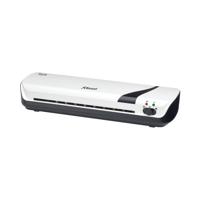
Choose the right laminator size
Start with the largest document you expect to laminate. A larger machine can normally laminate smaller documents too, so buying A3 rather than A4 can make sense if larger signs or posters are likely to be needed.
Buying Factor 2
Warm-up time and laminating speed
If you laminate occasionally, waiting a few minutes for a machine to warm up may not matter. In a busy office, school or print room, it can quickly become frustrating.
Compare both warm-up time and feed speed when choosing a machine for regular batch work. Faster machines can make a considerable difference where many documents are laminated together.
Buying Factor 3
Laminating pouch thickness
Laminating pouch thickness is commonly measured in microns. Thicker pouches create a firmer finished document, while thinner pouches provide protection while remaining more flexible.
| Requirement | What to Consider |
|---|---|
| Everyday protection | A lighter pouch may be suitable where flexibility is still desirable. |
| Frequently handled signage | A thicker pouch can provide a firmer and more durable finished document. |
| Teaching resources | Balance rigidity with easy handling and storage. |
Always check the maximum pouch thickness supported by your laminator before ordering pouches.
Buying Factor 4
Temperature and automatic settings
Different pouch thicknesses may require different operating temperatures. Some laminators use manual heat settings, while others automatically adjust according to the pouch being used.
Automatic settings can be particularly helpful in shared workplaces where several people use the same machine.
Buying Factor 5
Laminator features worth looking for
- Jam release: helps free an incorrectly fed pouch.
- Reverse function: allows the pouch to be backed out if it feeds incorrectly.
- Automatic shut-off: useful for shared environments where equipment may be left switched on.
- Automatic pouch detection: can simplify setup for different pouch thicknesses.
- Ready indicator: confirms when the machine has reached the correct operating temperature.
- Cold setting: useful if you need to work with compatible pressure-sensitive laminating materials.
Buying Factor 6
Match the laminator to your workload
Explore The Range
Browse laminators by brand
Once you know the size and workload you need, you can narrow the available machines by manufacturer.
Document Finishing
Laminating as part of document binding and presentation
Laminating is often used alongside other document-finishing products, particularly where organisations prepare training packs, presentations, reports, manuals or customer-facing documents.
Buying Factor 7
Cost, consumables and warranty
The purchase price of the machine is only part of the cost. Laminating pouches are an ongoing consumable, so consider the pouch sizes and thicknesses you expect to use regularly.
A reliable machine with an appropriate warranty can represent better value than a cheaper model that is poorly matched to your workload.
Compare machine specification, expected use, pouch compatibility and warranty support before making a decision.
Sustainability
How to laminate more thoughtfully
If lamination is genuinely needed, aim to make the finished item last long enough to justify the additional material involved.
- Laminate documents that will be reused regularly
- Avoid laminating short-term notices unnecessarily
- Choose the smallest appropriate pouch
- Use a pouch thickness appropriate to the job
- Reuse laminated signs and worksheets wherever practical
- Consider reusable sleeves or pockets for temporary information
Product Alternative
What about recycled laminating pouches?
Some pouch ranges incorporate recycled content, giving organisations another option where permanent lamination is still required.
Read our Fellowes Recycled Laminating Pouches Review for a closer look at one recycled-content option.
Quick Buying Checklist
Which laminator should you choose?
| Question | Why It Matters |
|---|---|
| What is the largest document size? | Determines whether you need an A4, A3 or larger machine. |
| How often will it be used? | Helps determine the speed and workload level required. |
| Which pouch thicknesses will you use? | The laminator must support the required micron range. |
| Will several people use it? | Automatic settings and jam protection can make shared use easier. |
| How important is speed? | High-volume environments benefit more from faster warm-up and feed speeds. |
| What warranty is included? | Useful when comparing the long-term value of similar machines. |
Avoid These Mistakes
Common laminator buying mistakes
- Buying an A4 machine and later discovering you regularly need A3
- Using pouches thicker than the machine supports
- Choosing a light-use machine for constant shared use
- Ignoring warm-up time when processing larger batches
- Buying on price without checking pouch compatibility
- Laminating documents that could simply use a reusable protective sleeve
Keep Reading
Related office equipment & sustainability guides
Final Thoughts
Choose the laminator that matches the job
The right laminator is not necessarily the biggest, fastest or most expensive model. It is the machine that matches your document sizes, workload, pouch requirements and working environment.
Use lamination where the additional durability is genuinely useful, select the machine according to your actual workload and consider reusable alternatives for documents that only need short-term protection.
Find the right laminator for your workplace
Compare A4, A3 and A1 laminators from leading workplace brands for offices, schools and shared workspaces.


Featured Blog Posts
Latest Blog Posts
.jpg)

.jpg "Green Office Free Delivery")


